
A wedding planning system is a fixed order for your decisions, a few written rules, and a handoff plan. Here is how to build one that survives a change of venue, a bigger guest list, and a tight budget.
Wedding planning feels endless mostly because every choice seems to touch every other choice. The guest list changes the venue, the venue changes the caterer, and the caterer changes the budget you thought you had settled in week two. Couples who stay calm through it usually aren’t more organized than everyone else. What they have is a wedding planning system, even if they never called it that.
They decide a small number of things early, in a deliberate order, and they stop reopening those decisions without a reason. That habit, written down, is a wedding planning system.
This guide lays out that wedding planning system from engagement to the final week. It is a method for sequencing choices, not another list of 200 tasks. If you want the task-by-task version, our wedding planning checklist covers it, and this article is the thinking that sits underneath it. If you are still deciding how big a project you are taking on, our wedding planning hub is the wider map.
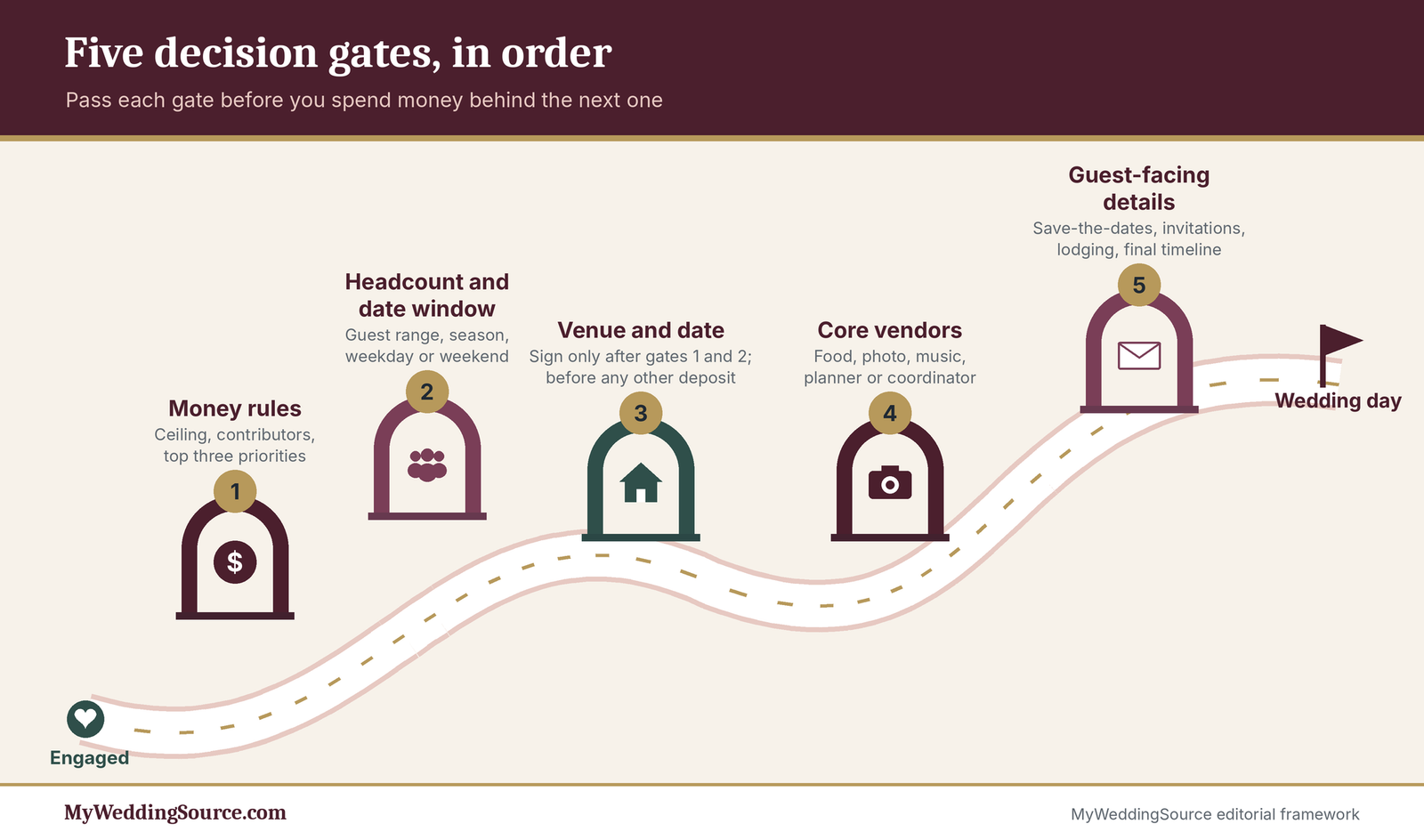
Quick answer A good wedding planning system runs on five decision gates: money rules, a headcount range and date window, venue and date, core vendors, then guest-facing details. Lock each gate before you spend money behind the next one, keep a one-page decision log and change log, and hand the final week to a named person who can decide without you.
How a wedding planning system differs from a checklist
Plenty of couples already own a checklist. Many of them are still stressed, and that tells you the checklist was never the missing piece. What was missing was the rule for which item comes first, which items can wait, and who is allowed to change what.
A checklist tells you what exists, a wedding planning system tells you what to do next
A checklist is a catalog. It is useful the way a grocery list is useful, but it has no opinion about whether you should buy the flowers before you know where the dinner is. A wedding planning system adds the opinion.
The problem with flat task lists
Flat lists treat “choose a cake flavor” and “sign the venue contract” as two lines of equal weight. They are not. One can be changed the week of the wedding with a phone call, and the other commits a large portion of your budget and fixes your date. A flat list is not a wedding planning system, and it also rewards the wrong behavior, because the easy items get checked off first and give you a pleasant feeling of progress while the heavy items sit untouched.
Couples often report that month four felt productive because they had crossed off thirty things, and month nine felt like a crisis because the three things that mattered were still open. The thirty things were real. They just were not load-bearing.
What a decision-first method changes
A decision-first wedding planning system sorts work by consequence rather than by category. You ask “what does this choice limit later?” before you ask “what category is this?” Venue limits caterer, photographer, rentals, and timeline. Napkin color limits nothing.
In practice, this means your calendar for the first few months looks short and heavy rather than long and light. You will make perhaps six or seven decisions that cost real money and real flexibility, and you will make them in order. Everything else waits in a parking lot until its gate opens.
What your wedding planning system has to include
A system can be four pages or forty. The version that gets used is the short one. Whatever wedding planning system you build needs a small set of parts, and each part needs an owner.
The five parts of a working wedding planning system
Every working wedding planning system we have seen in good form has the same five parts. There is a money rules page, which holds the ceiling and the priorities. There is a gate sequence, which says what gets decided in what order. There is a decision log, which records what you decided and why. There is a change log, which records what moved and who was told. And there is a handoff pack, which lets someone else run the day.
You will build each piece of the wedding planning system in the sections below, with templates you can copy. None of them needs special software. A shared note, a spreadsheet, or a paper folder all work. The tool matters far less than whether both of you open it.
Who owns your wedding planning system
Give the wedding planning system one keeper. This is not the person who makes every decision, since you are making them together. It is the person who updates the logs, runs the monthly review, and notices when a gate is about to be crossed without its checklist. In many couples the keeper is whoever enjoys spreadsheets, and the other partner is the designated skeptic who asks “did we write that down?”
If a parent is paying a large share, or a planner is hired, they join the system at defined points, which we cover in the gate sections. They do not get to edit the money rules page without the two of you in the room.
Start with the decisions that everything else depends on
Most couples open with the fun stuff: colors, dresses, a Pinterest board with 400 pins. That is fine as daydreaming. As wedding planning, it puts the cart before the horse, because nothing on that board has a price or a place yet.
The decisions that actually carry weight are fewer than you’d expect: how much you can spend, roughly how many people you’ll invite, and when and where. Everything else is downstream of those four.
Set your constraints before you choose details
A constraint is a limit you refuse to negotiate with a vendor. The point of setting them first is that you can say no quickly, which saves hours of tours and quotes that were never going to work.
Write your non-negotiables on one page
Give yourselves 30 minutes and a single sheet of paper. Each of you lists the three things that would make the day feel wrong if they were missing, then you compare. Maybe it’s a ceremony outdoors, your grandmother’s seat close to the front, and live music. Maybe it’s food people actually remember.
Anything that makes both lists becomes a rule. Anything on only one list becomes a conversation. Everything else is a preference, and preferences are what you trade away when the budget gets tight. Do this before the first venue tour, because tours are where sales pitches rewrite your priorities for you.
Turn vague wishes into numbers, dates, or yes/no rules
“Not too expensive” can’t be checked against a quote. “No more than $40,000 all in, including tax, service charges, and tips” can. “Fall-ish” can’t be checked against a calendar. “A Friday or Saturday between September 20 and October 25” can.
Run every wish through a simple test: could a stranger look at a vendor proposal and tell whether it passes? If not, it isn’t a rule yet. Our wedding budget guide walks through how to build that ceiling from guest count, venue model, and fees, and the budget calculator helps you split fixed costs from per-guest costs.
What this actually costs The Knot’s 2026 Real Weddings Study, which surveyed 10,474 U.S. couples married in 2025, reports an average wedding cost of $34,000 (median $24,000) for an average of 117 guests, or about $292 per guest. Zola’s 2026 First Look Report, drawn from more than 11,500 couples marrying in 2026, puts the expected average at $36,000. Those are survey averages from couples who chose to respond. Treat them as a sanity check, not a target, and rebuild your own number from local quotes.
Put the decisions in order so your wedding planning system doesn’t loop back
Order matters more than speed. A couple who books a photographer in month two and a venue in month nine often discovers the photographer’s availability, package, and style no longer fit the place they chose.
Find the dependency chain
Draw it in four boxes on paper: budget ceiling → guest count range → venue and date → everything else. Almost every other choice hangs off the venue. Caterers may be required or restricted by it. Rentals depend on what it provides. Your ceremony timing depends on its sunset, noise rules, and load-in windows. Your photographer’s best work depends on its light.
That’s why the venue sits so far up the chain, and why early guest-count thinking is not optional. You don’t need an exact list, but you do need a range (say, 90 to 110) before you tour anything.

Put a decision gate in front of each big commitment
A decision gate is a short checklist you pass before signing anything expensive. For the venue gate, it might read: budget ceiling written down, guest range agreed, two possible date windows chosen, and a quote that includes service charges and minimums. If one item is missing, you don’t sign yet.
The gates below are the ones that work for most U.S. weddings. The “lock by” column is deliberately relative to your own timeline, because a 6-month engagement and an 18-month one compress and stretch these differently.
| Gate | What gets decided | Who decides | Lock it by | What it unlocks |
|---|---|---|---|---|
| 1. Money rules | Total ceiling, who contributes, top three priorities | You two, plus any contributors | Within the first month | Venue shortlist, guest ceiling |
| 2. Headcount and date window | Guest range, season, weekday or weekend | You two, with family input only on the list | Before any venue tour | Venue search, capacity filter |
| 3. Venue and date | Venue, exact date, catering model | You two | Before any other vendor deposit | Caterer, photographer, music, hotel block |
| 4. Core vendors | Food, photo, music, planner or coordinator | You two (planner can advise) | Soon after venue contract | Design details, rentals, timeline draft |
| 5. Guest-facing details | Save-the-dates, invitations, lodging, final timeline | You two, then your coordinator | Per mailing and vendor cutoffs | Final headcount, seating, day-of schedule |
Why gates beat deadlines
A deadline says “do this by March.” A gate says “you may not do the next thing until this is done,” which is why gates sit at the center of a wedding planning system. The difference is that a gate protects you from a vendor’s urgency. When a venue tells you another couple is looking at your date, a gate lets you answer calmly: “We can sign once our headcount range is agreed, which is Thursday.” Without a gate, the same pressure turns a Thursday decision into a Tuesday panic.
A wedding planning system also gives you a clean way to include other people. A parent who wants a say in the venue can be told exactly which gate it belongs to and when it closes, rather than receiving a running commentary of half-made choices.
Gate 1 in depth: the money rules page of your wedding planning system
The first gate of a wedding planning system is the one most couples under-build. They have a number in their heads, perhaps a vague sense of who will contribute, and a feeling that they will “see how it goes.” A money rules page replaces the feeling with a document.
What goes on a money rules page
The page is a single side of paper, or a single screen. Its job is to answer five questions in under a minute whenever a quote arrives: how much is the ceiling, where is the money coming from, what are we protecting, what are we willing to cut, and who can approve a change.
The seven lines every page needs
Write these seven lines for your wedding planning system in your own words and fill in the blanks. First, the all-in ceiling, which includes tax, service charges, gratuities, attire, rings, and the rehearsal dinner if you are paying for it. Second, the contingency, which is a slice you hold back and do not allocate. Third, the sources, meaning each contributor and the amount or percentage they have committed. Fourth, the top three priorities, drawn from your non-negotiables page.
Fifth, the first three things you would cut. Sixth, the approval rule, such as “any single change over $500 needs both of us.” Seventh, the review date.
The sixth line is the one people skip, and it is the one that prevents the worst arguments. If either of you can say yes to a $900 upgrade alone at a tasting, the page is only a suggestion.
An illustrative allocation across categories
Percentages vary widely by region, guest count, and priorities, so treat the following as a worked illustration of how to structure the split, not a benchmark. Say a couple sets a $40,000 all-in ceiling and holds back 8 percent as contingency. That leaves $36,800 to allocate.
In this illustration, they give the venue and catering together about 50 percent of the allocatable amount, since that pairing usually dominates the budget. Photography and video take about 12 percent, music and entertainment about 7 percent, flowers and decor about 9 percent, attire and beauty about 8 percent, stationery and postage about 3 percent, and the remaining 11 percent goes to planner or coordinator fees, transportation, rentals not included at the venue, and the rehearsal dinner.
The numbers matter less than the shape. Notice that the largest line is a pairing, not a single vendor, because the venue and the food often can’t be priced separately. Notice also that the contingency came off the top, before anything else was assigned. Couples who treat contingency as “whatever is left” find there is none left. Our wedding budget guide shows how real quotes tend to shift these shares.
Negotiating contributions without starting a fight
Money from family is generous and complicated in equal measure. Most disagreements come from unstated assumptions, not from greed. One side assumes a gift, the other assumes a seat at the table.
Scripts for the first conversation with a parent
Have the conversation early, before you tour venues, and have it in person or by video if you can. Ask what they would like to contribute, if anything, and ask separately whether there are things they hope to have a say in. Keep those two questions apart. Here is one way to open.
“We’re putting together a budget this month, and we’d love to know whether you’d like to be part of it. There’s no pressure either way. If you do want to contribute, it would help us to know the amount or a range, and whether you’d rather it go toward something specific, like the dinner, or just toward the total.”
If they say yes, write down what you heard and send it back the same day: “Just so we have it right, you’re planning to contribute about $8,000 toward the total, with no strings on the vendor choices, but you’d love to be consulted on the guest list for your side. Is that right?” This is not paperwork for its own sake. It converts a warm moment into a shared fact.
If a contribution arrives with conditions you don’t want, you have three honest options: accept the conditions, negotiate a narrower version, or decline gracefully. A decline might sound like this:
“That’s so generous, and we want to be honest with you. We’ve made the venue decision together and we’d like to keep that between the two of us. Would you be comfortable with the gift going toward the dinner instead, where we’d love your input on the menu?”
When the two of you disagree about money
The less visible negotiation happens inside the couple. One partner wants to spend on photography, the other on the bar. The money rules page handles this if the top three priorities are real, but sometimes they conflict.
A workable tiebreaker is to give each partner one “protected” line, a category the other won’t challenge up to an agreed amount. If your protected line is live music at $3,500 and your partner’s is the photographer at $4,500, neither of you has to defend those choices in front of the other. Everything else gets negotiated against the shared priorities. It sounds mechanical, and it works because it turns a recurring argument into a single decision made early.
Gate 1 checklist and common failure modes
Before you let any venue see your name, the first gate should be closed. The checklist is short on purpose.
The Gate 1 checklist
- The all-in ceiling is written, and it includes tax, service charges, and gratuities.
- A contingency is set aside and unallocated.
- Every contributor’s amount and conditions are confirmed in writing, even if “in writing” is a text message.
- Three priorities are named, and three cuts are named.
- The approval rule is agreed, with a dollar threshold.
- A review date is on both calendars.
If you cannot tick all six, you are not ready to tour. This is not strictness for its own sake. Tours are where numbers get anchored, and an anchor set by a salesperson is rarely set in your favor.
Three ways Gate 1 fails
The first failure is the soft ceiling, a number that quietly grows every time a quote comes in a little high. The fix is the approval rule: a ceiling that cannot be moved by one person is a ceiling. The second is the phantom contribution: money that someone mentioned once at dinner and nobody has confirmed. Treat unconfirmed money as zero until it is not. The third is the all-in blind spot, where a ceiling omits attire, rings, or the rehearsal dinner, then surprises you in month eight.
If you are not sure which fees to expect, our guide to hidden wedding budget costs lists the lines couples most often forget to include.
Gate 2 in depth: a guest list system and a date window for your wedding planning system
The second gate pairs two things that look unrelated: who is coming and when. They belong together because both narrow the venue search before you spend a minute on tours. A venue that holds 70 is irrelevant if your range is 110 to 130. A Saturday in June is irrelevant if the guests you cannot do without can’t travel that week.
Build the guest list in tiers
Most guest lists grow because every name is treated as equal, so every name is either in or out. Tiers let your wedding planning system hold the line on the list without deciding every individual argument in advance.
Tier A, B, and C defined
Tier A is the people without whom the day would feel wrong: immediate family, closest friends, the wedding party and their partners. Tier B is the people you would be happy to see and would be sorry not to have: extended family you actually speak to, good friends, close colleagues. Tier C is the people you might invite if there is room, or because someone else asks: distant relatives, plus-ones for guests you rarely see, workplace invitations of obligation.
Build the list in that order. Count Tier A first and write the number down. Then add Tier B and write that number down. Only then look at Tier C, and only if the total so far leaves space under your ceiling. The point is that the cuts, if you need them, are already sorted. You are not choosing whom to disappoint under pressure. You decided the order calmly, months ago.
Counting the real headcount, not the invited number
Your invited number and your attending number are different. Some invitees will decline, and the share who do varies by how far people must travel, how close they are to you, and what time of year it is. Use a conservative planning assumption and label it as an assumption, never as a prediction. A planning range, such as “invite 120, plan for 95 to 110 attending,” is more useful than a single figure, and it is the range your venue search should use.
Keep two columns in your list from day one, because a wedding planning system lives on honest counts: invited and confirmed. The catering guarantee at the end is based on confirmed, but venue minimums are often based on a contracted number, and the gap between those two is where money is made or lost. We cover that gap in the venue and contract sections.
Cut rules and how to say no
Every list eventually needs a cut rule, because no list stays the same size untouched. The best cut rules are ones you can say out loud without apologizing.
Write the rules before anyone asks
Choose two or three rules that are about the category, not the person. Examples that people use include “no plus-ones unless engaged or married,” “no coworkers beyond our direct teams,” “no children under a certain age except family,” and “we invite people we’ve spoken to in the last year.” Pick rules that fit your life, then apply them evenly; a wedding planning system only works when the rules are not personal. The rule has to be one you would apply to your own best friend’s cousin, or it will not hold when your mother asks.
A rule also protects the relationship. “We drew a line at people we’ve spoken with this past year” is easier to hear than “we decided you didn’t make the cut.” Write the rules at the top of the guest list file so that you, not the version of you that is tired at 11 p.m., are the one deciding.
Scripts for saying no to a plus-one, a coworker, or a parent’s list
To a friend asking about a plus-one: “We’re keeping our list to people we both know well, so we’re not able to offer plus-ones this time. I hope you’ll understand, and I really hope you can come.”
To a relative offering to add names: “We have a number we have to hit and we’ve already used our side’s space. If you’d like to put your own names on a short list, we’ll look at it together, but we may not be able to add anyone.”
To a parent who is contributing and wants a bigger list: “We want your friends there, and we can give you a set number of seats. Here is how many. You choose who fills them, and we won’t change the number later.”
The third script works because it gives the parent a defined role. A fixed allotment is more generous than it sounds, and it ends the negotiation. Our guide to real wedding guest list problems goes deeper on the family dynamics that make this hard.
Choose a date window, not a date
Picking an exact date at this gate is too early. You do not yet know which venues are available on it. Pick a window instead.
Season, day of week, and flexibility
A good window names a season, a day-of-week preference, and a width. “A Friday or Saturday between mid-September and late October” is a window. It gives a venue enough room to say yes, and it lets you compare quotes on different dates. Many venues price Fridays, Sundays, and off-peak months below Saturday peaks, and that is worth asking, since being flexible by one day can change the quote.
State any dates you cannot do: a close relative’s own wedding, a school-year pinch, an important work period. The cleaner your exclusion list, the faster venues can tell you whether they fit.
Gate 2 checklist and failure modes
- Guest list is tiered, with counts for A, B, and the A+B total.
- A planning range for attendance is written and labeled as an assumption.
- Two or three cut rules are written at the top of the list.
- Any family list allotments are agreed in numbers.
- A date window and an exclusion list are written.
The classic failure at this gate is the “sneaky headcount”: a list that sits at 100 in the spreadsheet and 135 in everyone’s heads. The second is the single date obsession, where a couple falls in love with one Saturday and begins to rank every venue by whether it is free that day. The third is skipping the tiers and then running a very painful cut at month six, when invitations are already designed.
Gate 3 in depth: a venue decision method for your wedding planning system
The venue gate is where a wedding planning system is tested hardest, because the venue is the largest single decision and also the one that is most persuasively sold. Tours are staged. Light is good, flowers are in the vases, and the coordinator is charming. The method below is designed to keep you comparing the same things across every place you visit.
Before you tour: filter hard
A tour costs half a day. Ten tours cost a month of weekends. Filter by email first and tour only the places that pass.
The five-question email filter
Send the same email to every venue on your list. It should state your date window, your guest planning range, your all-in ceiling in terms they can respond to, and ask five things. Is a date in my window open? What is the facility fee or rental rate? Is there a food-and-beverage minimum, and what does it include? What service charge and taxes are added on top? Are outside caterers allowed, and if so is there a fee?
Venues that do not reply with numbers are telling you something about how the rest of the relationship will go. Venues that reply with a brochure and an invitation to tour are not answering the question. You are allowed to ask again, politely, for a sample quote at your headcount range.
Reading a venue’s pricing model
Venue pricing falls into a few shapes, and knowing which one you are looking at prevents false comparisons. A flat rental fee with outside vendors allowed puts the burden of assembling everything on you. A per-person all-in package bundles the room, food, and sometimes bar and rentals. A food-and-beverage minimum asks you to spend a set amount on the venue’s catering, with the room fee on top or waived. A hybrid mixes these, such as a rental fee plus a required caterer list.
The number that will be on the first page is rarely the number you will pay. Add the service charge, the tax, the bar, the rentals the venue doesn’t supply, and the fee for the ceremony space if it’s separate. Our guide to wedding venue contract hidden costs walks through the lines that most often get added after the tour.
On the tour: questions that reveal what the brochure hides
Take the same list to every tour. Take notes on the same sheet. Take a photo of the room set up for the capacity you actually need, not for the largest layout they can fit.
Questions worth asking on the tour
Questions worth asking at every venue tour What is the maximum capacity for a seated dinner with a dance floor, not the maximum for a standing reception? What time can vendors load in and when must we be fully out? What happens if it rains, and who decides, and by when? Is there a sound limit, and what time does music have to stop? Which vendors are required and which are optional? What is the payment schedule, and which payments are refundable? Who from your staff is physically here on the day?
Follow the answers with a request to see the room as your wedding would use it. Walk the path a guest takes from parking to the ceremony. Find the restrooms and count them. Stand where the DJ would stand and look at the outlet situation. Stand where your caterer would work and ask where the kitchen is. These are small observations, and they are the ones that will matter in the final week.
Details that quietly decide the day
Some details do more work than they should. Parking and shuttle capacity affect whether older guests arrive relaxed. The distance between the ceremony space and the cocktail area affects your timeline. Whether the getting-ready room is actually private affects the photographer’s morning. Access to the venue the night before, or at least the morning of, affects how much decor you can realistically do.
None of these appear in a package sheet. All of them show up in the way a day feels. If a venue cannot answer these questions precisely, they may not have run the kind of event you are planning.
A venue scoring sheet that keeps tours comparable inside the wedding planning system
By the third venue, tours blur. A scoring sheet restores the details you would otherwise forget, and it keeps your emotional reaction from outvoting your priorities.
A sample scoring sheet
Score each venue from 1 to 5 on each line, then weight the lines by your own priorities. Here is a plain-text version you can paste into a note.
VENUE SCORING SHEET

Venue: ______________   Tour date: ________
Date offered: ________   Capacity (seated + dance floor): ____

HARD FILTERS (any "no" ends the conversation)
[ ] Open on a date in our window
[ ] Fits our upper guest range seated, with dance floor
[ ] All-in estimate at our guest count is under our ceiling
[ ] Contract terms are readable and we can have time to review

WEIGHTED SCORES (1-5)           Weight   Score   Total
Ceremony space we love            x3
Food quality / caterer options    x3
Flow: ceremony to dinner          x2
Rain or heat plan                 x2
Guest comfort: parking, access    x2
Vendor flexibility                x1
Staff responsiveness              x2
Photo light and backdrops         x1

ALL-IN ESTIMATE (written by the venue, not by us)
Rental / facility:  $______
Food and beverage:  $______
Service charge:     $______
Tax:                $______
Rentals not included: $______
TOTAL:              $______   Per guest: $______

Notes / red flags: ________________________
The hard filters come first because they save time. A venue that fails any one of them is out, however pretty the courtyard. The weighted scores come second, and the weights should come from your Gate 1 priorities. If food is a top priority and you give it a weight of 3, you are telling yourself in advance that you won’t let a gorgeous staircase override a mediocre menu.
Holding the sheet against your gut feeling
Gut feeling is data. It tells you how you will feel in the room on the day, and that matters. The sheet is not a replacement for the feeling; it is a check on it. When a venue gets a big total on the sheet but you leave feeling flat, ask why. Sometimes it is a missing detail the sheet did not capture. When a venue scores mediocre but you cannot stop thinking about it, check whether the high-weight lines are the ones you are excited about, or whether you are responding to something decorative.
If the sheet and the feeling disagree after that exercise, go back for a second visit at a different time of day. Seeing the room at the hour your ceremony would happen settles more arguments than any amount of discussion.
Date selection, holiday weekends, and peak season
Once a venue is leading, the date window narrows to a date. This is where the cost of an unusual choice, or a popular one, shows up.
Planning for a holiday weekend
A holiday weekend gives guests a free day off, which is a genuine advantage for travel. It also tends to mean higher travel prices, fuller hotels, competing family plans, and vendors who are in demand or who charge a holiday rate. None of those is a reason to avoid one. They are reasons to price the weekend before you commit.
If you are considering a holiday weekend, ask each vendor whether they charge differently on holiday dates, and ask guests who matter most whether the weekend causes a conflict. Plan the save-the-dates early. Give guests extra lead time, because travel booking competes with their own plans. Our guide to save-the-date timing covers how far ahead to send them.
Planning in peak season
Peak season in most of the U.S. leans toward late spring and early fall, though the pattern varies by region and by climate. In peak season, good venues and popular vendors fill first, and the pressure to commit quickly is highest. That is exactly when the gates of your wedding planning system matter most, because pressure is how a Gate 3 signature happens before Gate 1 is closed.
Two practical responses help. First, widen your window by a day of the week or by a few weeks, since the price and availability trade-offs are often better there. Second, ask the venue for a hold. Many venues will hold a date for a short, defined period without a deposit, and that window is enough for you to close your checklist.
Gate 3 checklist and failure modes
The Gate 3 checklist
- Written all-in estimate from the venue at your headcount, including service charge, tax, and fees.
- Capacity confirmed in writing for your seating style, including dance floor.
- Rain, heat, or cold plan documented in the contract or an addendum.
- Catering model and any required vendors listed in the contract.
- Payment schedule, cancellation, and rescheduling terms read in full.
- Your date inside the window, and a second-choice date noted.
- Both partners have visited, and one of you has seen the room at the right hour.
Where venue decisions go wrong
The first failure is falling for the room before the pricing. The remedy is the email filter: numbers first, tours second. The second is signing under time pressure and later discovering the minimum is not reachable at your headcount. The third is trusting verbal promises, such as “we always let couples bring their own cake,” that don’t make it into the contract. If it isn’t in the paper, it isn’t a promise.
The fourth is choosing a venue that makes you dependent on a single caterer whose pricing you only learn after the date is held.
Gate 4 in depth: booking core vendors in a sensible order within your wedding planning system
With a venue signed, the rest of the vendors come in a sequence. Booking them out of order is the most common source of rework, because each vendor has availability, style, and logistics that depend on the ones before.
Which vendors to book first
Order is determined by two things: how many dates a vendor can serve per year, and how much the rest of your plan depends on them.
A booking order that works for most weddings
For most U.S. weddings, a workable order is: venue (done), then a planner or coordinator if you are hiring one, then caterer if the venue doesn’t supply, then photographer, then music, then videographer if you want one, then florist and rentals, then stationery, then the cake or dessert. Officiants, hair and makeup, and transportation tend to fit in around these, depending on your local market and date.
In a wedding planning system, a planner or coordinator comes early because their advice shapes the rest, and because they have relationships with vendors who might suit your venue. A caterer comes early because food is often the largest per-guest cost, so the quote tells you what’s left for everything else. Photographers book out far in advance in busy seasons, because one photographer can only be at one wedding per day.
Why the order changes with the venue model
If your venue includes catering, the caterer step vanishes, and the money goes toward more flexible lines such as music or flowers. If your venue is a blank canvas, such as a barn, a garden, or a rented hall, the planner and rental company become more important because they supply much of what makes the space work. If you are marrying at a hotel, the room block and the banquet captain become central. Our guides to hotel wedding venues and all-inclusive wedding venues explain how those models change what you need to book.
Run quote comparisons apples to apples
Vendors present quotes in their own formats. Without a method, you end up comparing a three-hour package to a six-hour package, or a quote that includes tax to one that doesn’t. The work of comparison is largely translation.
The comparison sheet
Build one row per vendor and one column per element that matters to you. Include the all-in price, hours of coverage, what is included, what is extra, the deposit and payment schedule, the cancellation terms, and the team that will actually appear. Convert everything to the same basis: the total at your expected headcount, including tax, service charge, and any travel fee.
For a photographer, the elements are hours, number of photographers, delivery timeline, number of edited images, print rights, and any travel charge. For a caterer, they are the per-person price, what’s in it (staffing, rentals, china, linens), the bar model, the service charge, and the cake-cutting or plating fees. When a quote doesn’t state an element, ask. Silence on a line usually means it’s not included.
Questions that make quotes comparable
Ask each vendor the same five questions in the same words, in writing. What is included in this price? What is not included and typically added? What is the final total for my date and headcount, including every fee and tax? What is your payment schedule and which payments are refundable? What do you do if you’re ill or unavailable on my date?
The last question is the most telling. A vendor who has a clear, specific answer, such as a named backup professional or a written substitution policy, has thought about it. One who says “that never happens” has either been lucky or hasn’t been paying attention. For role-specific question lists, see our guides on questions for a caterer and questions for a florist.
Read the contract like it will be used against you
Contracts are written by the vendor, to protect the vendor, so the wedding planning system includes your own reading checklist. That is normal. Your job is not to reject the contract. It is to understand which parts of it protect you.
A plain-language contract checklist
Look for each of these items in every contract, and be able to point to the sentence where it appears.
- Deposit: how much, when due, and whether it’s refundable or applied to the balance.
- Payment schedule: every due date and amount, and the penalty for lateness.
- Cancellation by you: what you owe at each stage, sometimes on a sliding scale as the date approaches.
- Cancellation or failure by the vendor: what they owe you, and whether they must provide a comparable replacement.
- Rescheduling: whether you can move the date, what it costs, and whether it depends on availability.
- Insurance: whether the vendor carries liability coverage and whether the venue requires you to carry event liability insurance.
- Meals: whether vendor meals are required, and at what price per vendor.
- Overtime: the hourly rate, who must approve it, and how overtime is triggered.
- Minimums and guarantees: the minimum spend or guest count, and the date your final number is due.
- Service charges and gratuity: what is added and whether it goes to staff or the house.
- Substitution: what changes the vendor can make to menus, products, or staff without asking.
- Force majeure: the clause on events outside anyone’s control, and what happens to your money.
If you do nothing else, read cancellation, rescheduling, and the vendor’s obligation if they can’t perform. Those three lines tell you who carries the risk. Our guides on wedding vendor contract red flags and the venue contract hidden-cost checklist go into specific wording to watch for.
What to do when a contract doesn’t say what you were told
Vendors often promise things in conversation that are missing from the document. The right response is neither suspicion nor acceptance. Ask, in writing, for the promise to be added: “In our call you mentioned that the second shooter is included. Could you add that to the agreement before we sign?” Reasonable vendors will do it, and the speed and tone of the response is useful information.
If a vendor refuses to put a verbal promise into writing, treat the promise as not made. That may mean you negotiate it again, or choose differently. Either way, you are making that choice with open eyes. The Ohio Attorney General’s consumer guidance makes the same point about written promises, and it also recommends paying deposits by credit card where possible, since cards generally offer dispute rights that cash and checks do not.
Gate 4 checklist and failure modes
The Gate 4 checklist
- Venue contract signed and its vendor rules noted.
- Planner or coordinator chosen, with scope written.
- Caterer, photographer, and music chosen on comparison sheets, with all-in totals.
- Every contract read against the contract checklist, with open questions answered in writing.
- Payment schedule entered on the shared calendar.
- Total committed is checked against the money rules ceiling and contingency.
Where vendor booking goes wrong
Couples lose money at this gate of the wedding planning system in three ways. They book on charm rather than on terms, so the nicest vendor wins even when a competitor offered the same service for less and with clearer cancellation. They stack deposits, and discover in month six that the payments due this quarter exceed what they planned. And they book vendors whose styles do not match the venue, which causes the rework this gate was designed to prevent.
The fix for the second is a payment calendar. When the contract is signed, enter every due date for every vendor into one view. Seeing the sum of next quarter’s payments is a clarifying experience.
Gate 5 in depth: guest-facing details and the final timeline of a wedding planning system
The fifth gate of the wedding planning system is where the day becomes visible to other people. Save-the-dates, invitations, lodging, and the timeline all communicate your decisions outward, and each one is costly to retract once sent.
Save-the-dates, invitations, and lodging
These are the first things guests see. They should only go out after Gates 1 through 4 are firmly closed, because they publish your date, location, and rough style.
Sequence the mailings to the vendor cutoffs
Work backward from the dates your vendors need. The caterer wants a final count on a certain date. The venue wants a guarantee. The rental company wants an order. The invitation response date has to land before all of those, with a gap for chasing people who don’t reply. Our guides to save-the-date timing and invitation timing and wording give a calendar for mailing.
A simple rule: set your RSVP deadline at least three to four weeks before the earliest vendor cutoff. You will need that time to follow up with the guests who haven’t replied, and there will be some.
Handling lodging and travel for guests
If a meaningful number of guests are traveling, lodging goes out with the save-the-date or soon after. Block rooms at one or two properties at different prices, and put the booking instructions and cutoff on your wedding website. Each room block has its own terms, including an attrition clause that can make you responsible for unfilled rooms, so read it as carefully as a vendor contract. Our guide to destination wedding room blocks explains those terms in detail.
The final timeline and seating
The day-of timeline is a draft until the last month, and it should be built backward from fixed points rather than forward from the morning.
Build the timeline from fixed points
Start with the points you cannot move: sunset if you want outdoor photos, the venue’s end time, the ceremony start, and the meal service window. Then place everything else around them with buffers. A ceremony that starts 20 minutes late is common. A timeline that has no slack for it is the one that causes a rushed dinner and an abbreviated dance floor.
Share the draft with every vendor and ask each to confirm their own times in writing. Differences you catch at this stage cost a message. Differences you catch on the day cost a conversation under pressure. Our guide to wedding day timeline failure points lists where schedules most often break.
Seating without turning it into a war
Seating is the last big guest-facing decision and often the most emotionally loaded. Use your Tier list as a guide: tables of Tier A guests near you, Tier B arranged by connection, and Tier C placed with people they know. Start from the people who must not sit together and the people who must, and let everyone else fall into place.
Do it once, near the end, after your final count is in. Redoing seating every time someone changes their RSVP is a fast way to lose a weekend. Hand the final chart to the coordinator, with the rule that only they can change it on the day.
Gate 5 checklist and failure modes
The Gate 5 checklist
- RSVP deadline set before the earliest vendor cutoff, with a buffer.
- Room block terms read, and cutoff dates posted.
- Dietary needs and accessibility needs collected.
- Timeline built from fixed points and confirmed by every vendor.
- Seating chart drafted from the final confirmed list.
- Final count delivered to caterer and venue by their deadlines.
How guest-facing details go wrong
Invitations go out before the venue’s rain plan is settled, and then half the guests are told one thing and half another. Room blocks are set with high attrition and not tracked. The RSVP deadline is too close to the vendor cutoff, so a stack of unanswered invitations becomes a guess. And the timeline lives in three versions on three phones. The change log in the next section of the wedding planning system is built to stop the last of those.
Move from the plan into bookings without losing your priorities
Plans survive until the first sales call. A good vendor will make you feel your priorities are right and also happen to cost more than you budgeted. This section is about keeping your original reasoning attached to each booking, so that a wedding planning system built in January still governs a signature in June.
Turn the plan into commitments that vendors and guests can see
A booking is a promise with a price tag. Once a deposit leaves your account, you’ve made a decision that is slow and often costly to undo, so it deserves a bit more ceremony than a quick text saying “sounds good.”
Separate reversible decisions from expensive ones
Sort every open choice into three bins: easy to change later, painful to change, and effectively permanent. Napkin color is easy. Moving a ceremony from a courtyard to a ballroom after invitations go out is painful. A signed venue contract with a nonrefundable deposit is close to permanent.
Spend your thinking time on the second and third bins. Let the first bin wait until the last responsible moment, when you’ll know more and prices have settled. Our guide to wedding vendor contract red flags is worth reading before you sign anything in the third bin.
Write an acceptance test for every booking
An acceptance test is one sentence that says what “done right” looks like. For a caterer: “Final per-person price, including service charge and tax, is under $135, and the contract names the exact menu.” For a photographer: “Delivered gallery within eight weeks, second shooter named in writing.”
If a proposal can’t pass the test you wrote beforehand, you have two honest options. Renegotiate until it does, or change the test deliberately and write down why. What you shouldn’t do is let the test quietly drift because the vendor was charming. For the cost side of this, see hidden wedding costs to know which line items to ask about up front.
Questions worth asking before any deposit Is the deposit refundable, and under what conditions? What happens to my payment if you’re unable to work my date? What’s the all-in total with service charges, taxes, and gratuities? Who exactly is showing up that day? The Ohio Attorney General’s consumer guidance recommends getting promises in writing and paying deposits by credit card when you can, since cards generally offer dispute rights that cash and checks don’t.
Keep a decision log so your wedding planning system stops reopening settled questions
The decision log is the quietest part of a wedding planning system, and the one that pays back most reliably in month eight, when somebody asks why you chose the second venue and you cannot remember.
What a decision log entry looks like
Each entry is five lines: the decision, the date, the options you considered, the reason you chose this one, and what would make you reopen it. That last line is the useful one. It turns “we decided” into “we decided, and here is the specific event that would change our mind.” Written down, it protects you from two kinds of drift: stubbornly sticking to a choice after the facts changed, and anxiously reopening one when nothing did.
DECISION LOG

Decision: Venue = Maple Hall (ballroom + courtyard)
Date decided: March 14
Options considered: Maple Hall; Riverside Barn; Harbor Inn
Why this one: Only option under ceiling at 110 guests with rain plan
  built in; caterer included; held our second-choice date.
Reopen only if: Venue cannot confirm capacity of 120 seated in
  writing, OR all-in total rises more than 5% before signing.
Owner: Sam. Logged in change log? N/A (first entry)
When to reopen a logged decision
Reopen a decision only if its stated trigger occurs or a new fact appears that you could not have known. Preference changes alone, such as seeing a friend’s wedding with a different style, do not count. A useful discipline is to wait 48 hours after the urge to reopen something. If it still feels important then, write down what is new, and take it to your monthly review rather than to a text thread at midnight.
This is not about being rigid. It is about spending your attention where the facts changed, and not on second guesses. Most reopened decisions turn out to be the same decision with a worse mood attached.
Build a review rhythm that catches drift early
Wedding budgets rarely blow up in one dramatic moment. They drift. A few extra guests here, an upgraded bar package there, a late-night snack nobody planned. A short, recurring review catches that drift while it’s still cheap to fix.
Recheck money, guest count, and timing together
Once a month, spend 20 minutes on three numbers: money committed versus ceiling, current guest list versus range, and weeks remaining versus open decisions. Looking at them together matters because they move each other.
Here’s a worked example, and the arithmetic is illustrative rather than a quote. Say your plan assumed 120 guests, and your caterer, rentals, and stationery together run about $180 per guest. If your list creeps to 150 guests, that’s 30 more people and roughly $5,400 in extra per-guest costs before you even ask whether the room fits them. The review exists to notice that creep at 128 guests, when you can still choose a trim over a trade.
| If this changes | Revisit first | Then check | Usually unaffected |
|---|---|---|---|
| Guest count rises about 20% | Venue capacity and catering minimums | Rentals, invitations, seating, bar | Photographer, officiant |
| Date moves | Venue and caterer availability | Every vendor’s calendar, travel and lodging | Budget ceiling, guest range |
| Venue changes | Catering rules, rentals, sound limits | Timeline, ceremony location, transport | Dress, rings, officiant |
| Budget drops about 15% | Per-guest items (food, bar, rentals) | Guest list size, date, day of week | Marriage license, officiant |
Keep a change log when one decision moves three others
A change log is a note on your phone or a shared doc with one line per change: date, what moved, what else it touched, who needs to know. It looks fussy until the day your florist, planner, and mother-in-law have three different versions of the ceremony start time.
The rule that makes it work is simple. If a change touches more than one vendor, it goes in the log and gets sent to everyone it touches within 48 hours. Keep the log short and boring.

Trace one change all the way through the wedding planning system
The easiest way to see why the logs in a wedding planning system matter is to follow a single change from the first conversation to the last confirmation. Take the guest count example above, and watch what a rise from 120 to 150 does when it is handled carefully.
The ripple, step by step
You notice the list at 128 during the monthly review. Rather than letting it creep, you check the venue contract. The room is rated for 140 seated with a dance floor, so 150 does not fit. That single fact changes the conversation: this is no longer “can we afford 30 more guests?” but “do we want a different room, a smaller list, or a different layout?”
Meanwhile the caterer’s guarantee is due in 90 days, the invitations are not yet ordered, and the rental company has not locked a quantity. So you have a few options and no deposits at risk. You open the change log, write a line, and notify the three vendors whose numbers depend on the count. Total elapsed time: an hour of work and a couple of emails.
The same change handled badly
Now imagine the list simply reaches 150 by the time invitations print. The venue discovers the count at final headcount and offers a different layout that eliminates the dance floor. The caterer’s minimum has been met, but staffing for the larger group costs extra. The rentals order is short, and the shortage is discovered when the rental company has already allocated stock elsewhere.
Nothing in that sequence is unusual. Each step is reasonable on its own. What failed was the absence of a place where the first change was written down and spread outward. A change log would have cost an hour in March. Its absence cost a negotiation in the final month.
A change log template for your wedding planning system
Because it is small, the change log is easy to skip. Make it easier to keep than to skip.
The one-line format
Use one line per change, in a fixed order, in the same place every time. The point is that nobody needs to read prose to understand it.
CHANGE LOG

Date    | What changed            | Touches                          | Told (date)        | Cost impact
Apr 02  | Guest range 100-120 ->  | Venue capacity, caterer min,     | Venue, caterer,    | +$2,700 est.
        | 110-135                 | rentals, invitations count       | rentals (Apr 03)   | (illustrative)
Apr 19  | Ceremony 4:30 -> 5:00   | Photographer, DJ, florist,       | All four + parents | $0
        |                         | shuttle, officiant               | (Apr 19)           |
The “told” column is the one that closes the loop. A change that has been written down but not communicated is still a rumor.
Running the monthly 20-minute review
Pick a standing date for the wedding planning system review, such as the first Sunday, and keep it. Open the money rules page, the guest list, the decision log, and the change log. Check the three numbers: committed versus ceiling, guest list versus range, and weeks left versus open decisions. Read the change log from the past month and ask whether any change touched a vendor who has not been told.
End by naming the one gate decision coming up next and who owns it. The review is short on purpose. If it runs long, it is turning into a planning session, and that belongs on a different day.
Running a wedding planning system around a full-time job
Most couples plan in the margins: evenings, lunch breaks, and the occasional Saturday that is not already booked with someone else’s event. A wedding planning system matters more for these couples, not less, because they cannot afford to redo work.
Budget your hours the same way you budget your dollars
Time is a constraint, and it deserves a number. Without one, your wedding planning system expands to fill whatever evenings are free.
An hours-per-week budget
As an editorial rule of thumb, rather than a measured figure, many working couples find that three to five hours per week each is a sustainable load for the first half of planning, rising to a bit more in the months right around the big bookings and the final stretch. Choose a number that fits your own job. The value is in picking a number and noticing when you exceed it.
Spend those hours in blocks. One 90-minute weekly session beats six scattered 15-minute fragments, because decisions need context and context takes time to load. Pick the same day and time each week and treat it as a standing appointment.
What to batch and what to delegate
Batch the work that benefits from being done together: three venue tours in one Saturday, all vendor emails in one sitting, all payments on one date each month. Delegate work that does not need the two of you: collecting addresses, researching shuttle companies, drafting a first version of the website.
Delegation inside a wedding planning system works only with a clear brief. “Can you help with the website?” gets nothing. “Please draft the schedule page using this list of events, and send it to us to approve by the 15th” gets a result.
A 30/60/90 day rhythm for your wedding planning system
A wedding planning system needs a cadence. The following rhythm repeats, and its value lies in being predictable.
The first 90 days
Days 1 to 30: close Gate 1 and start Gate 2. Hold the money conversation with contributors, write the money rules page, start the tiered guest list, and write your date window. Days 31 to 60: finish Gate 2, send the email filter to venues, and begin tours. Days 61 to 90: score venues, choose, hold a date, read the contract, and close Gate 3 with a signature.
Notice that the first ninety days contain almost no purchases other than a venue. That is the point. The decisions made in this window determine the next year, and the vendors who are most tempting in these weeks are usually the ones whose timing you can safely ignore.
Days 90 to 180 and beyond
From day 90 to 180, close Gate 4: planner or coordinator, caterer, photographer, music. Each booking runs through the comparison sheet and the contract checklist. Enter the payment schedule on a shared calendar as soon as each contract is signed.
After day 180, the work shifts to Gate 5 and to the monthly review. By this point you should have fewer big decisions each month and more small ones. If you are still making big decisions, check whether an early gate was closed without its checklist.
If your engagement is shorter than a year, compress the rhythm rather than skipping steps. The gates still go in order; each simply takes fewer weeks. Our wedding planning checklist shows how the same sequence stretches or squeezes, and the wedding planning system holds either way.
Adapting a wedding planning system for distance or a destination
If you and your partner live in different cities, or the wedding is far from where either of you lives, the wedding planning system needs a few additions. Visits are scarce, and each one has to count.
Plan visits like projects
Site visits are expensive in time and money. A distance wedding is won or lost in how well you use them.
Prepare a visit brief
Before a trip, list what you need to decide there and what can be decided remotely. Book tours back to back, take the scoring sheet, and photograph everything, including exit routes, restrooms, and parking. Meet the venue coordinator in person if possible, since that relationship becomes your main channel.
Use the visit to taste food and to meet the people who will actually be at the wedding. Remote relationships work better after at least one face-to-face meeting with the person who will run the day.
Use a local ally
A local planner, coordinator, or trusted friend becomes your eyes. Give them the same documents you’d give a day-of lead: priorities sheet, vendor contacts, a spending authority. If you hire a coordinator, hire earlier than you otherwise might, since much of their value in a distance wedding comes from the months before the day.
Our comparison of wedding planners and coordinators explains how to choose the scope that fits.
Destination-specific additions
A destination wedding adds layers: travel for guests, local regulations, and vendors you may not be able to meet. The five gates still apply, with a few modifications.
Adjust the gates for travel
At Gate 2, the headcount range should account for the fact that travel reduces attendance, and your save-the-dates need much more lead time. At Gate 3, check for legal and paperwork requirements in your location, and verify with local authorities. At Gate 5, lodging is not a convenience but a major part of the plan. Our guides to destination wedding etiquette and the destination wedding checklist cover the details.
Marriage license and legal-ceremony requirements differ by place, and in some cases couples complete the legal ceremony at home and hold a symbolic one abroad. Confirm the rules with the official authority in the location, and do not rely on a vendor’s summary.
Verify vendors you cannot meet
When you can’t meet vendors, ask for video calls, recent references, and written scope. Pay deposits by a method that offers some dispute protection, as the Ohio Attorney General’s consumer guidance recommends. Confirm in writing who will be present and what the plan is if travel or weather disrupts them.
If a vendor is reluctant to show you recent work from a similar venue, that may be the answer. A good vendor in a remote location tends to have a strong portfolio and strong references, because they depend on both.
When something goes wrong: how a wedding planning system responds, in prose
Vendors cancel, venues close, budgets get shocked. Having a wedding planning system does not prevent these; it changes what you do next. The key is to run the same short sequence of questions every time instead of reacting.
Vendor cancels or cannot perform
A vendor cancellation is stressful, and the first reaction is usually to find a replacement within the hour. Slow down for a day and run through the questions in order.
The first-24-hours sequence
First, read the contract: what does it say about the vendor’s failure to perform, and about refunds? Second, ask the vendor in writing what they propose, including a refund timeline and any referral. Third, check the change log and decision log: what did this vendor’s role touch? Fourth, tell the people who depend on the vendor’s work, such as your planner, your venue, and any vendor whose timeline relied on theirs. Fifth, begin replacement searches with your acceptance test as a filter.
Do not sign a replacement in the first day. Panic is when a worse contract gets signed. Ask the vendor who canceled for referrals, and your coordinator for suggestions, since they know who is reliable.
When the replacement costs more
If the replacement costs more than the refunded deposit, you now have a budget question, and it goes back to your money rules page. Use the contingency first. If that does not cover it, consult the list of three cuts you wrote in Gate 1. This is exactly what the list was for. It converts a stressful negotiation into a prepared choice.
Where a vendor’s failure is clearly their responsibility under the contract, ask for compensation for the cost difference. Whether you receive it depends on the contract and the circumstances, so read the clause before you ask.
The venue becomes unavailable or the date has to move
A venue closure, a serious family event, or a change in circumstances can force a new venue or a new date. These are the biggest changes your system can face, and they are where the dependency chain pays off.
Which gate do you go back to
Ask what changed. If the date moved but the venue is intact, you go back to Gate 3 for date confirmation and then through the vendors’ calendars. If the venue is gone, you go back to Gate 3 in full, and every vendor that depends on it gets flagged in the change log. The budget ceiling and the guest range usually survive, which is why they sit above the venue in the chain.
Plan to repeat the gate checklist, not to skip it. A replacement venue picked in a hurry is where the worst repeats happen. Our guide to cancellation and postponement goes deeper on the contract and the insurance side.
Protect the money while you decide
While you work out the new plan, avoid paying any additional deposits. Ask each affected vendor for a written statement of their rescheduling terms. Consider whether event insurance, if you purchased it, applies, and read the policy for what it actually covers rather than what you assume it does.
A budget shock
Sometimes the problem is money: a contributor withdraws, a job changes, or costs surprise you. The wedding planning system’s response is calm and ordered.
The three levers
You have three levers, in the order to consider them: the guest count, the date or day of week, and the scope of the priority list. Guest count is usually the strongest, because per-guest costs run through food, bar, rentals, and stationery. Date and day of week can shift the venue and some vendor prices. Scope changes, such as dropping a videographer, are real but smaller.
Use the change-impact matrix in your wedding planning system: a budget drop of about 15 percent means revisiting per-guest items first. Work through the list of three cuts, then the lever of guest count, and only then consider reducing items on your top three priorities.
Talking to vendors about a smaller budget
Vendors respond to clear, honest information. A script might read:
“We’ve had a change in our budget and we want to keep working with you. Our new total for this category is $X. Is there a version of your package that fits, or a date or day where the price is better?”
Many vendors have options they do not advertise. Some do not. Either way, you have asked directly, and you can decide from there.
Finish your wedding planning system with a handoff instead of a longer checklist
By the final month, most of the real decisions are made. What’s left is execution, and execution is where couples accidentally keep too much on their own plates. The goal is to make yourselves unnecessary on the wedding day.
Assign ownership for the final week
Weddings don’t fall apart because nobody cared. They wobble when something unexpected happens and nobody knows whether they’re allowed to make the call.
Name someone who can decide without you
This could be a hired planner, a day-of coordinator, a venue coordinator, or a very organized friend with clear instructions. What matters is that one person has authority over vendor questions and small changes. If you’re deciding between professionals, our comparison of the wedding planner vs. coordinator roles breaks down who typically owns what.
For a sense of scale, The Knot’s planner cost data puts the national average around $2,100, with day-of coordination averaging about $1,600.
Give that person your one-page priorities sheet, the vendor contact list, and permission to spend up to a set amount on problems. Write the amount down. “Handle it” is not an instruction. “Handle it, up to $300, and text us only if it’s more” is.
Give every handoff a time, a place, and a fallback
Anything that passes from one person to another on the day gets three details: when, where, and what happens if it doesn’t. The cake goes from the baker to the venue at 2:00 p.m. at the loading entrance, and if the baker is late, the coordinator calls at 2:20. Rings go from the best man to the officiant at the rehearsal, and a backup is in the coordinator’s bag.
For a deeper look at where timelines tend to break, read wedding day timeline failure points and build your fallbacks around the three most likely ones.

The final month and the final 72 hours of your wedding planning system
The last month of a wedding planning system looks different from the first eleven. The decisions are small, the confirmations are many, and the goal is to remove yourselves from the flow of information.
The final month, week by week
Four weeks out: send the final count to the caterer and venue as their contracts require, confirm the final timeline with every vendor, and pay anything due. Three weeks out: finalize seating, confirm rentals, and deliver the song lists and must-have photo list. Two weeks out: do the open-questions sweep below, and prepare the handoff pack. One week out: send confirmation emails and hold the final walkthrough call with your coordinator.
Keep the final month free of new decisions. A new idea in week three is a decision that needs to pass the gates, and the gates are closed. Park it in a list, and put it in a “later” bucket.
The final 72 hours
Seventy-two hours out, your job is to pack, hand off, and rest. Deliver the handoff pack, which includes the timeline, the vendor contact sheet with phone numbers and arrival times, the priorities sheet, the spending authority amount, the seating chart, the payment envelopes or payment instructions with tips labeled by vendor, and the emergency kit list. Our vendor tipping guide can help you prepare these in advance.
The day before, attend the rehearsal if you have one, confirm that the rings and license paperwork are in a known place, and let the coordinator own the questions. If a vendor calls you, redirect them to the coordinator with a short sentence: “Please check with Jordan; Jordan can approve that.”
Decide what a calm final week looks like
You can’t control everything in the last seven days. You can control how many open questions are still floating around.
Clear the open questions out of your inbox
Two weeks out, make one list of every unanswered question: final headcount, dietary notes, seating changes, vendor arrival times, payments due. Then close them in a single sitting, or hand them to the person who owns that area.
Anything that still needs a couple’s decision after that list is closed should be a real exception, not a leftover. If the same item shows up on the list for three days, it’s probably a decision you’re avoiding. Make it, or delegate it.
Close the loop with confirmations and documents
Each vendor gets a short confirmation email one week out: date, arrival time, location, contact on the day, and the final balance and how it will be paid. Keep replies in one folder. Bring printed copies of the marriage license paperwork, contracts, and the vendor contact sheet to the venue.
Marriage license rules are set by the state or county, and waiting periods and expiration windows vary. A Justia 50-state survey (last reviewed in 2023) lists examples like a 24-hour wait in Delaware and a 3-day wait in Florida, with licenses expiring in as little as 30 days in some places. Check your own county’s current rules rather than relying on any general summary, ours included. And if a honeymoon flight needs a new or renewed passport, look at the State Department’s current processing times now, since they shift and mailing time comes on top.
Decision rule for the whole system If a choice costs money, touches another vendor, or can’t be undone after invitations go out, it needs to pass its gate and go in the change log. If it fails any of those tests, decide it whenever it’s convenient and move on.
Start your wedding planning system this week
A wedding planning system is only useful once it exists on paper. You do not need to wait for a free weekend to begin; the first version takes about two hours.
The two-hour setup
What to build in the first sitting
Create one shared folder for your wedding planning system with five documents: the money rules page, the tiered guest list, the venue scoring sheet, the decision log, and the change log. Fill in only what you know. The money rules page can have blanks. The decision log can be empty. The value of the folder is that every future decision has a home on the day it is made.
Then put two dates on both calendars: the monthly review, and the date by which Gate 1 will be closed. Everything else follows from those.
What to leave for later
Leave colors, dresses, and decor in the daydream folder until their gates open. Leave vendor research beyond the venue until Gate 3 closes, apart from reading how the roles work. This is not about forbidding fun. It is about keeping early energy on the decisions that carry the most weight.
Next step Set a 30-minute meeting with your partner this week. Bring one sheet of paper. Write your three non-negotiables each, compare, and write the all-in ceiling at the bottom. That page is Gate 1, and it is the foundation your wedding planning system rests on.
Adapting the wedding planning system to a smaller or simpler wedding
Fewer vendors does not mean fewer gates
A small wedding still needs a wedding planning system, with a budget, a headcount, a venue, and a handful of vendors. The gates compress, and the checklists shorten, but the order still applies. Our guides to micro-wedding ideas and small wedding ideas show how couples scale the choices down.
Keep the logs, skip the ceremony
For a very small event, the decision log may be five lines and the change log may never get a second entry. That is fine. What matters is that when a decision does move, you have a place that records it.
Glossary of terms vendors use in a wedding planning system
Vendors use a vocabulary that sounds like common sense and often is not. A term misunderstood at signing becomes a cost at the end.
Venue and catering terms
Food-and-beverage minimum, service charge, and gratuity
A food-and-beverage minimum is the amount you commit to spend on the venue’s catering. If your final spend is under it, you may still owe the difference, depending on the contract, so ask what counts toward it. Tax, service charge, and sometimes gratuity may or may not count. A service charge is a percentage added to the bill, and ask whether it goes to the staff or to the house.
Gratuity is the tip, and it may be built into the service charge or listed separately. Read both lines, since one may stand in for the other, and never assume.
Guarantee, load-in, and overtime
The guarantee is the final guest count you commit to pay for, due before the event by a date in the contract. If fewer guests attend, you usually still pay for the guaranteed number. Load-in is the window in which vendors may enter to set up, and load-out is when they must leave. Overtime is the hourly charge when the event or setup runs past the contracted time. Ask who approves overtime and how it is calculated, so that you can decide in the moment whether to extend.
Contract and risk terms
Attrition clause, force majeure, and hold
An attrition clause, common in room blocks, allows the hotel to charge you if too few rooms are booked by guests. A force majeure clause describes events beyond anyone’s control and how the contract treats them. A hold is a temporary reservation of a date without a deposit, and it usually expires on a stated day. Ask for each in writing, and ask what exactly triggers them.
Deposit, retainer, and non-refundable
A deposit is a payment that reserves the date and is generally applied to the final total. A retainer is often a payment for reserving a person’s time and may be non-refundable by nature. Non-refundable means exactly what it says, even if the vendor re-books the date, unless the contract says otherwise. Ask whether the amount is refundable if they can re-book the date, since some contracts allow that and some do not.
Frequently asked questions about a wedding planning system
What is a wedding planning system?
A wedding planning system is a set of written rules and a fixed order for making wedding decisions. It typically includes a money rules page, a sequence of decision gates, a decision log, a change log, and a handoff plan for the final week. Unlike a checklist, a wedding planning system tells you what to decide first and what can wait.
How long does a wedding planning system take to set up?
A first version takes about two hours: a money rules page, a guest list in tiers, and a blank decision log and change log. It grows as decisions are made. The monthly review adds around 20 minutes.
Do I need a wedding planner if I use a wedding planning system?
It depends on your time, budget, and how complicated the event is. A system reduces the chaos of decisions but does not replace someone to run the day. Many couples use their own system through booking and then hire a day-of coordinator for the final stretch.
Does a wedding planning system work with a six-month engagement?
Yes. Keep the same order and compress the timing. Gates 1 and 2 might close in a week or two, and Gate 3 may need to move quickly because dates in a short window are limited. The cost of skipping the gates is higher, not lower, when time is tight.
How does a wedding planning system stop family from reopening decisions?
Share the decision log entries that affect them, with the reason for each. Tell them which gate a question belongs to and when it closes. People accept a decision more readily when they can see the reasoning and know the next opening for input.
Should the budget come before the guest list?
Both are needed before touring, and they feed each other. Set the ceiling first, since it decides how many guests you can host at a given per-guest cost. Then build the guest list in tiers and see whether it fits. If it does not, the cut rules decide.
How much contingency should I hold back?
There is no universal number. Some couples hold back a modest slice, and others hold more when they are planning a complex or outdoor event. Pick an amount that would let you absorb one surprise without touching your priorities, and keep it unallocated.
When should I book the photographer?
Usually soon after the venue and date are confirmed, since photographers can only serve one wedding per day. In busy seasons, popular ones book far ahead. Book once the venue and date are secure and you have compared at least a few quotes on the same basis.
What do I do if a vendor will not put a promise in writing?
Treat the promise as not made. Ask once, politely, to have it added. If they refuse, you can renegotiate, choose another vendor, or accept the risk knowingly. Do not rely on a verbal assurance for anything that costs money.
Can I use this wedding planning system for a destination wedding?
Yes, with adjustments. Allow for lower attendance and longer lead times, check the legal requirements where you are marrying, use a local ally, and verify vendors you cannot meet. The five gates and the logs apply the same way.
Sources & methodology
This article is an editorial synthesis, not original research. Survey figures are self-reported by couples who chose to respond to each publisher’s survey and reflect the sample years noted below. Dollar examples labeled illustrative are our own arithmetic, not vendor quotes. Marriage license rules and any government processing times change, so confirm them with your county clerk or the issuing agency before you plan around them.
- The Knot, Real Weddings Study 2026 data read-out (PDF): 2025 wedding cost, guest count, and cost per guest; 10,474 U.S. couples.
- The Knot, Real Weddings Study overview: survey design, participants, and timeframe.
- Business Wire, The Knot Worldwide announcement of the 2026 Real Weddings Study, February 18, 2026: headline results and methodology summary.
- Zola, The First Look Report: 2026 average cost, guest count, and engagement length.
- Zola, First Look Report 2026 landing page: sample of more than 11,500 couples marrying in 2026.
- Justia, Getting a Marriage License: 50-State Survey: examples of state waiting periods and license expiration windows (reviewed July 2023).
- Ohio Attorney General, Tips for Savvy Wedding Planning: written promises, deposit questions, and paying by credit card (2014 newsletter; consumer principles, not current prices).
- U.S. Department of State, Passport processing times: official page for current passport timing if either of you needs a passport before a honeymoon.
- The Knot, How Much Do Wedding Planners Charge?: planner and coordinator cost context.